
Ads Radar: See Which Ads Run in ChatGPT and Google AI Mode
SupaIntent Ads Radar tracks paid placements in ChatGPT and Google AI Mode, showing who advertises on your tracked prompts, what they say, and how often they appear.

Building product experiences that make AI visibility measurable and actionable.
Paid placements can now appear alongside AI answers. When a buyer asks ChatGPT which tool to pick, an ad can sit below the answer, and most brands have no idea whose ad it is. We built SupaIntent Ads Radar to close that blind spot.
TL;DR: AI answers can carry sponsored placements, and SupaIntent Ads Radar tracks them. It captures every ad served on the prompts you monitor in ChatGPT and Google AI Mode, with the advertiser, the creative, the ad copy, how often it ran, and when it was last seen. You see which of your buying questions competitors are paying to sit next to, and what they say once they get there. Available on the Pro and Custom plans.
What Ads Radar tracks
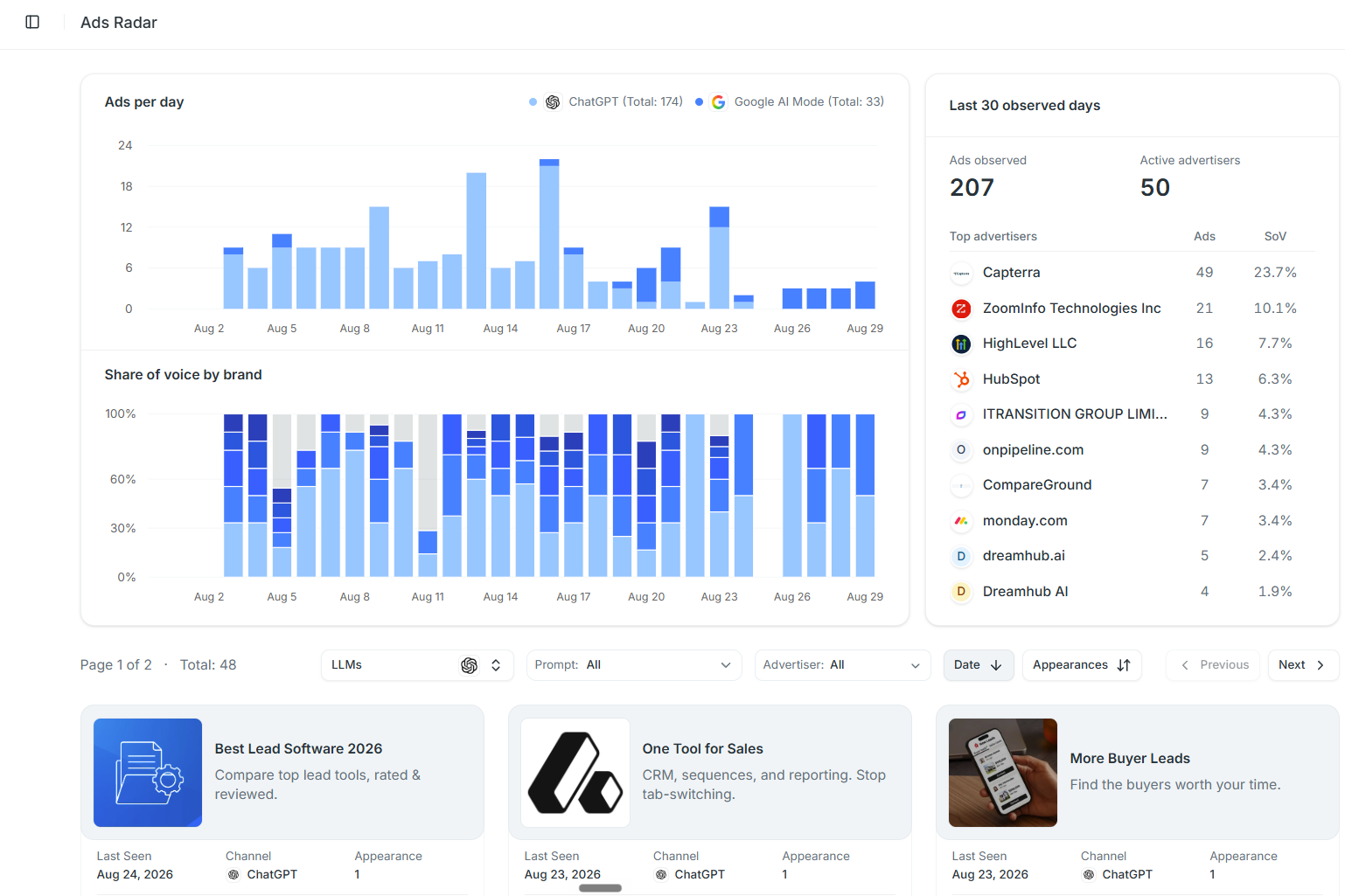
SupaIntent Ads Radar watches the prompts you already track. Whenever an answer comes back carrying a paid placement, it pulls the ad out and logs:
- Creative and headline
- Ad copy
- AI engine
- Advertiser and domain
- Appearance count
- Last seen date
Captured in the browser, as a buyer sees the answer, not through an API.
One appearance is noise. Eight appearances across three weeks signals ongoing spend.
How the dashboard breaks down ad activity
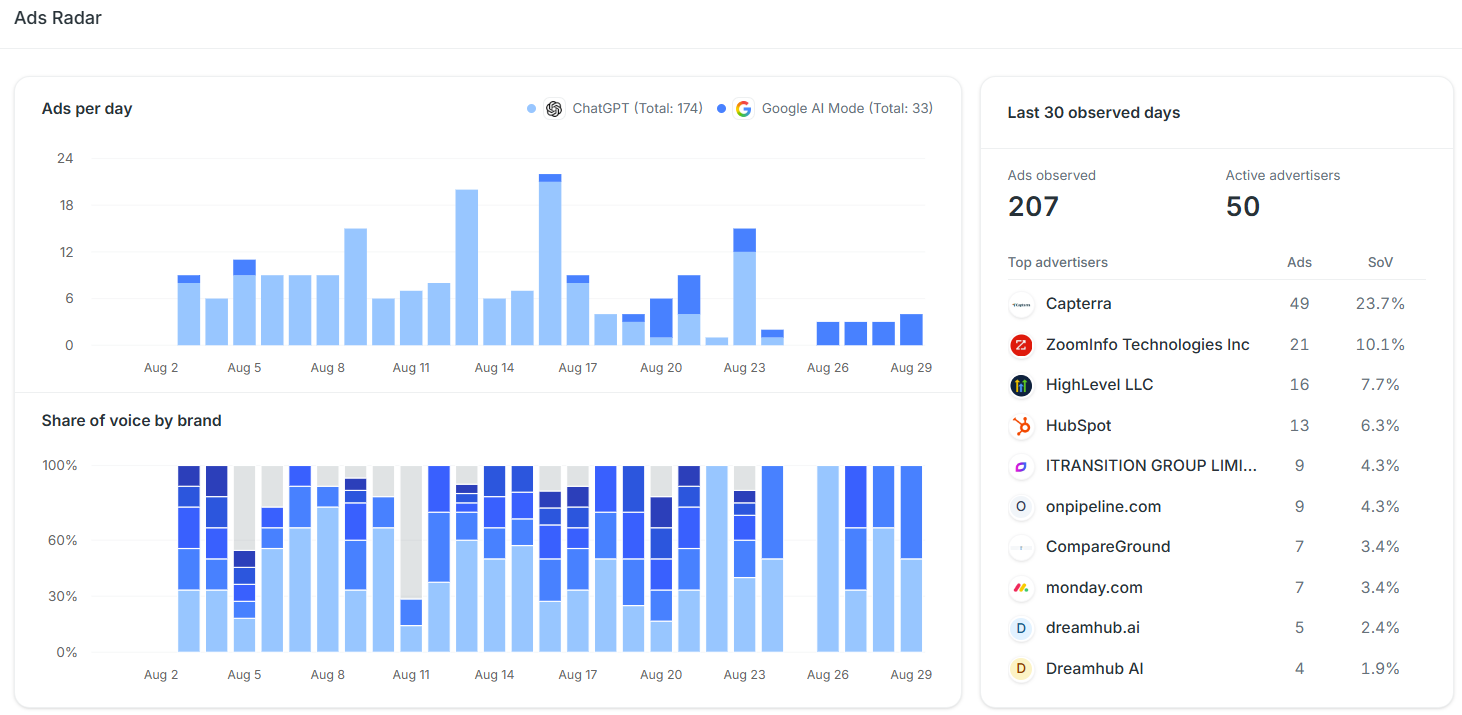
Three views summarize ad activity in your category.
Ads per day
This charts ad volume over time, split by engine. It shows whether paid activity in your category is climbing or flat, and where that movement is happening.
Share of voice by brand
This stacks the same period by advertiser, so you can see who is gaining ground against whom. It turns a collection of individual ads into a clear view of competitive pressure.
Top advertisers
This ranks every company by ad count and share for the last 30 observed days. It gives you a fast starting point for the brands investing most heavily in the prompts you care about.
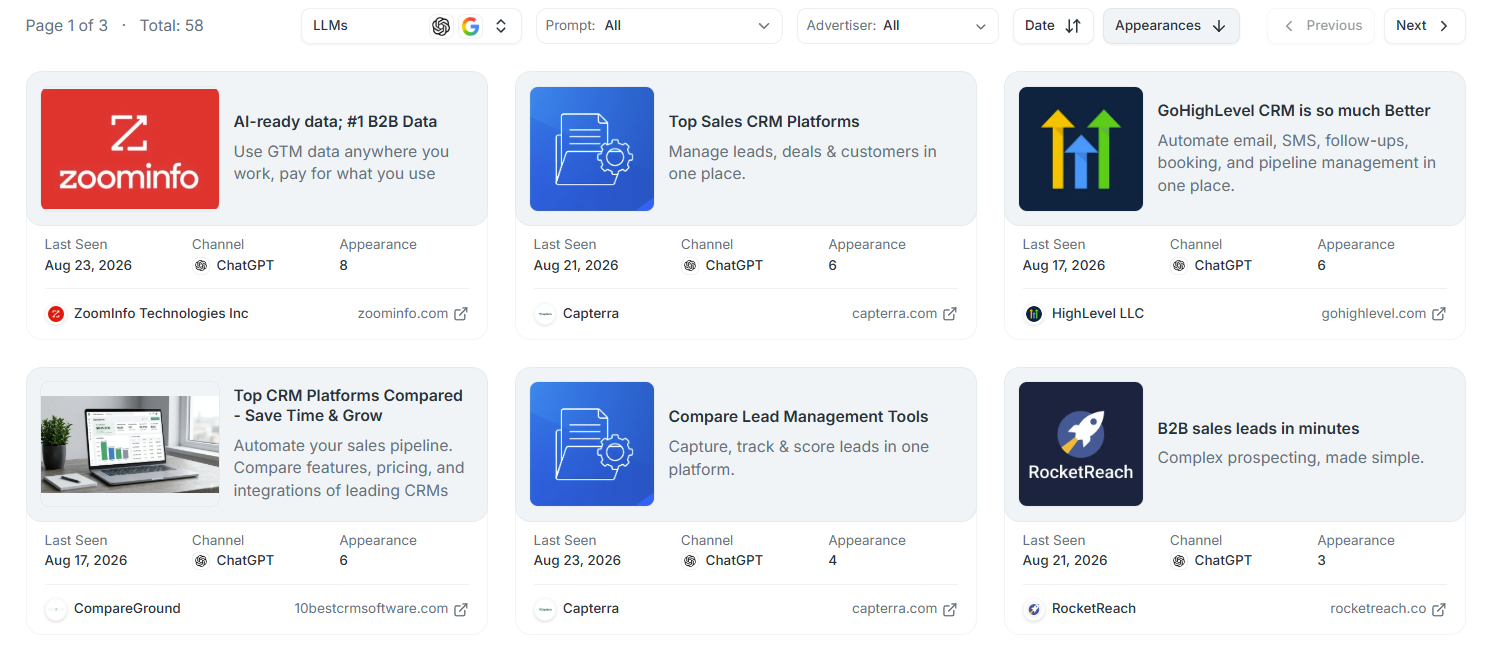
The ad list filters by engine, prompt, advertiser, and date, then sorts by appearances. Filter one prompt to see which competitors pay to appear on that buying question.
Why tracking ads in AI answers matters
Until now, the AI answer was treated as one surface: either the model recommends you or it does not. Paid placements split that surface in two. A brand can be doing everything right organically and still lose the click to an advertiser sitting next to the answer, and without tracking there is no way to know it happened.
Ads reveal three signals:
-
Demand validation
Advertisers do not spend on questions that go nowhere, so a prompt attracting repeat placements is a buying question someone has already qualified with budget. That makes it a priority for your content and placement work whether or not you ever run an ad yourself.
Insight: paid activity is the cleanest available signal of commercial intent on a prompt. Somebody has done the math and concluded buyers make decisions there.
-
Competitive positioning
Rivals put their sharpest claims into paid headlines, because those headlines are tested and paid for. Reading them tells you how competitors frame themselves against you, and the landing pages behind the ads tell you which comparison they think they win.
-
The intermediary problem
Review directories and comparison sites already rank among the sources AI engines pull from when they assemble a recommendation. When one of those sites also buys placements on the same question, it reaches your buyer twice, once as a cited source and once as an ad, while a brand with neither is absent from both routes.
Takeaway: if a directory is both cited on a prompt and advertising against it, getting listed and well reviewed there beats trying to outbid it.
How to use Ads Radar on your own prompts
Start with the prompts closest to a purchase decision, the comparison and "best tool for" questions. Sort by appearances rather than by recency, because repetition signals budget and a single sighting rarely does.
Then read the ad copy itself, not just the advertiser names. Check which domains the ads point to as well, since a rival sending traffic to a comparison page is telling you where it believes it wins.
Finally, cross-reference the advertisers against your citation sources. Any domain that shows up in both lists is a placement target worth prioritizing.
For a broader view of ads observed in ChatGPT, browse the Free ChatGPT Ads Library. Search by advertiser, ad copy, or domain, then compare creatives and last seen dates.
For a practical walkthrough of the free library, see how to see which ads are running in ChatGPT.
Availability
SupaIntent Ads Radar is available on the Pro and Custom plans. Find it under Ads Radar in the sidebar, and it starts logging ads on the prompts you already track. The rest of the SupaIntent dashboard sits alongside it: prompt tracking, citations, competitors, and brand pages. Start a 7-day free trial when you are ready to track the prompts that matter to your category.
FAQ
Does ChatGPT show ads?
Yes. Eligible ChatGPT users may see a clearly labeled sponsored placement below an answer. SupaIntent Ads Radar records those placements on the prompts you monitor.
Which AI engines currently show ads?
Paid placements currently appear in ChatGPT and Google AI Mode, and SupaIntent Ads Radar tracks both. Coverage expands as other engines roll out advertising.
How can I see which competitors advertise in AI search?
Track the prompts your buyers ask, then review the advertisers appearing on them. SupaIntent Ads Radar ranks every advertiser by ad count and share of voice, and lets you filter to a single prompt to see who is paying to appear on that specific question.
Is it worth tracking AI search ads if I do not run ads?
Yes, for two reasons. Ad spend marks a prompt as commercially valuable, which helps you prioritize organic work. Reading competitor ad copy also reveals the positioning and claims rivals are willing to put budget behind.
What data does Ads Radar record for each ad?
The creative, headline, and ad copy, plus the advertiser, their domain, the engine it ran on, the number of appearances, and the date last seen. Appearance counts separate sustained campaigns from one-off sightings.
Which plans include Ads Radar?
SupaIntent Ads Radar is included on the Pro and Custom plans, and it covers the prompts already set up in your project.




[ get started ]
Make AI Search your next revenue channel
Track and optimize visibility in ChatGPT, Gemini and other AI Search engines to drive traffic to your website that converts.