
How to Get Cited in ChatGPT: Match the Searches It Runs
ChatGPT does not search for what you type. Here is how to see the searches it runs, what they look like, and how to make your pages match them.

Building product experiences that make AI visibility measurable and actionable.
When ChatGPT answers a buying question, it does not cite pages at random. It runs its own web searches, reads what comes back and cites the pages that answer those searches best. Edward Sturm made this the core of a recent video on getting cited in ChatGPT, building on Cyrus Shepard's AI citation ranking factors analysis. We checked the idea against the searches ChatGPT actually ran for prompts tracked in SupaIntent.
TL;DR: The strongest lever is matching the searches ChatGPT runs (its "fan-out" queries), not the prompt a user types. In 17,962 ChatGPT searches we recorded, only 5.3% repeated the prompt word for word; 27% added the year, 12% asked for "official" information and 9% used site: to read a vendor's own pages. Put the answer at the top of the page, link to good sources and keep facts current. llms.txt and schema matter far less.

ChatGPT does not search for what you type
Here is a typical buying question. On November 2, 2026, ChatGPT answered "best CRM for small business" with a shortlist of HubSpot, Attio and Pipedrive, a price table and cited sources:
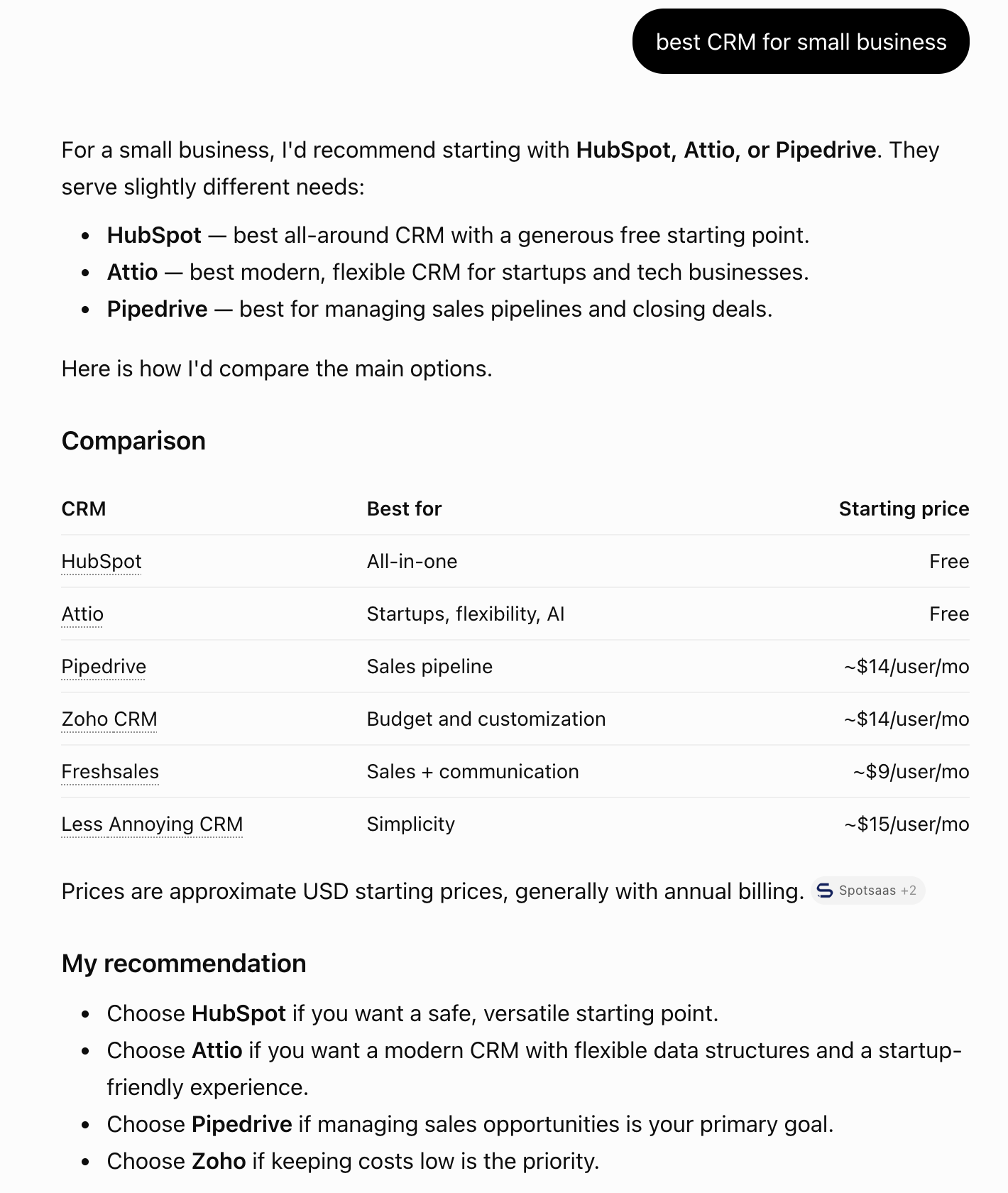
To build that answer, ChatGPT searched the web first. Ask ChatGPT "best CRM for SME" and it does not send that phrase to a search engine. In one CRM project we track, that single prompt produced searches such as:
best CRM for small business SME 2026 HubSpot Zoho Pipedrive Salesforce pricing featuresPipedrive pricing officialsite:hubspot.com crm small business pricingsite:zoho.com/crm pricing small business
ChatGPT rewrites the question, adds the year and the brands it already expects, then goes to each vendor's own site to check pricing. A page that ranks for "best CRM for SME" but has no clear pricing for small businesses will lose to one that does.
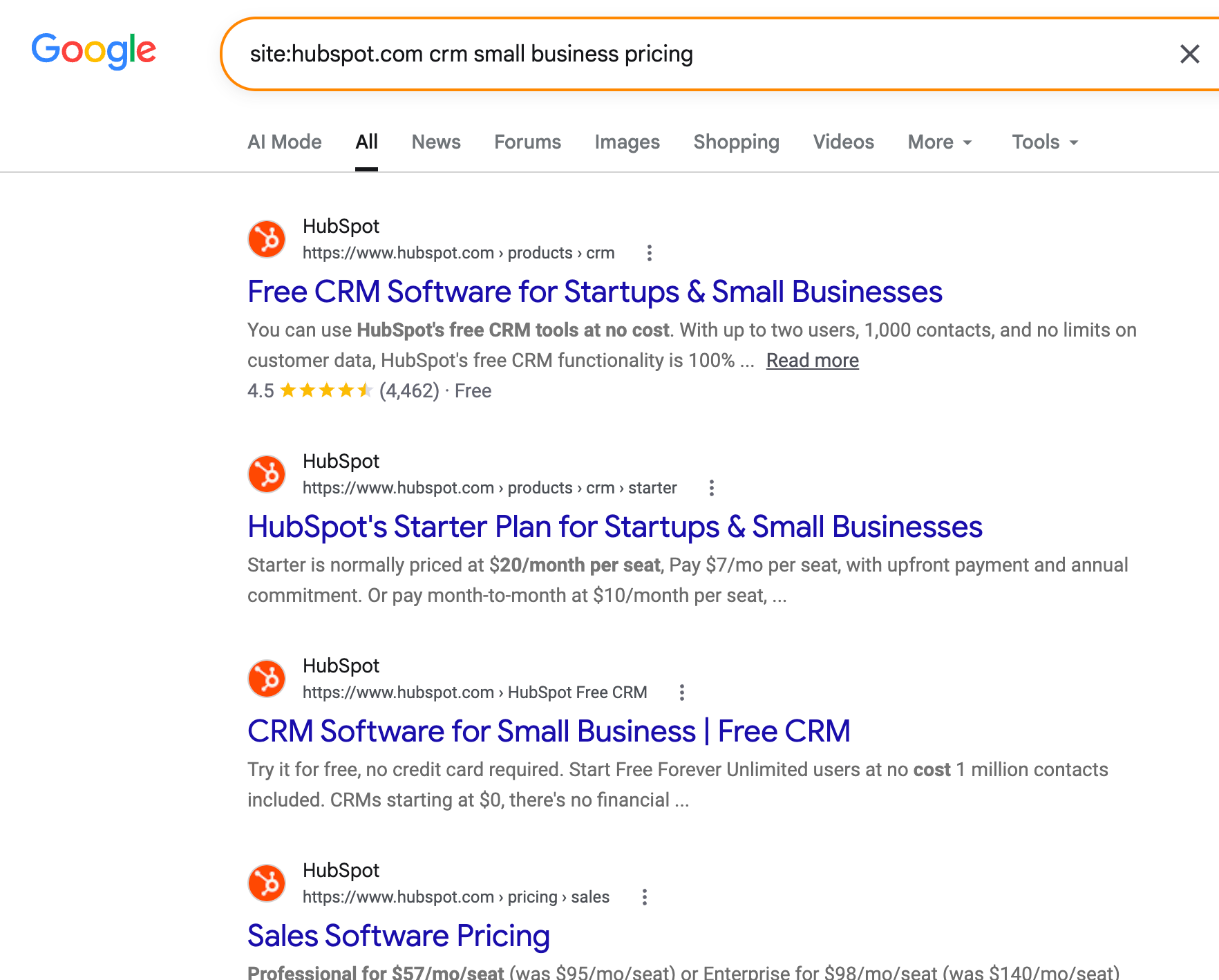
This is what ChatGPT gets back when it runs site:hubspot.com crm small business pricing: HubSpot's own pages with free plan limits and Starter pricing right in the snippets. That is the material it quotes.
In Shepard's analysis of 23 factors, the top of the list is about exactly this: the page must be accessible, rank in search and rank for the fan-out queries, and its content must match the query. llms.txt sits at the bottom.
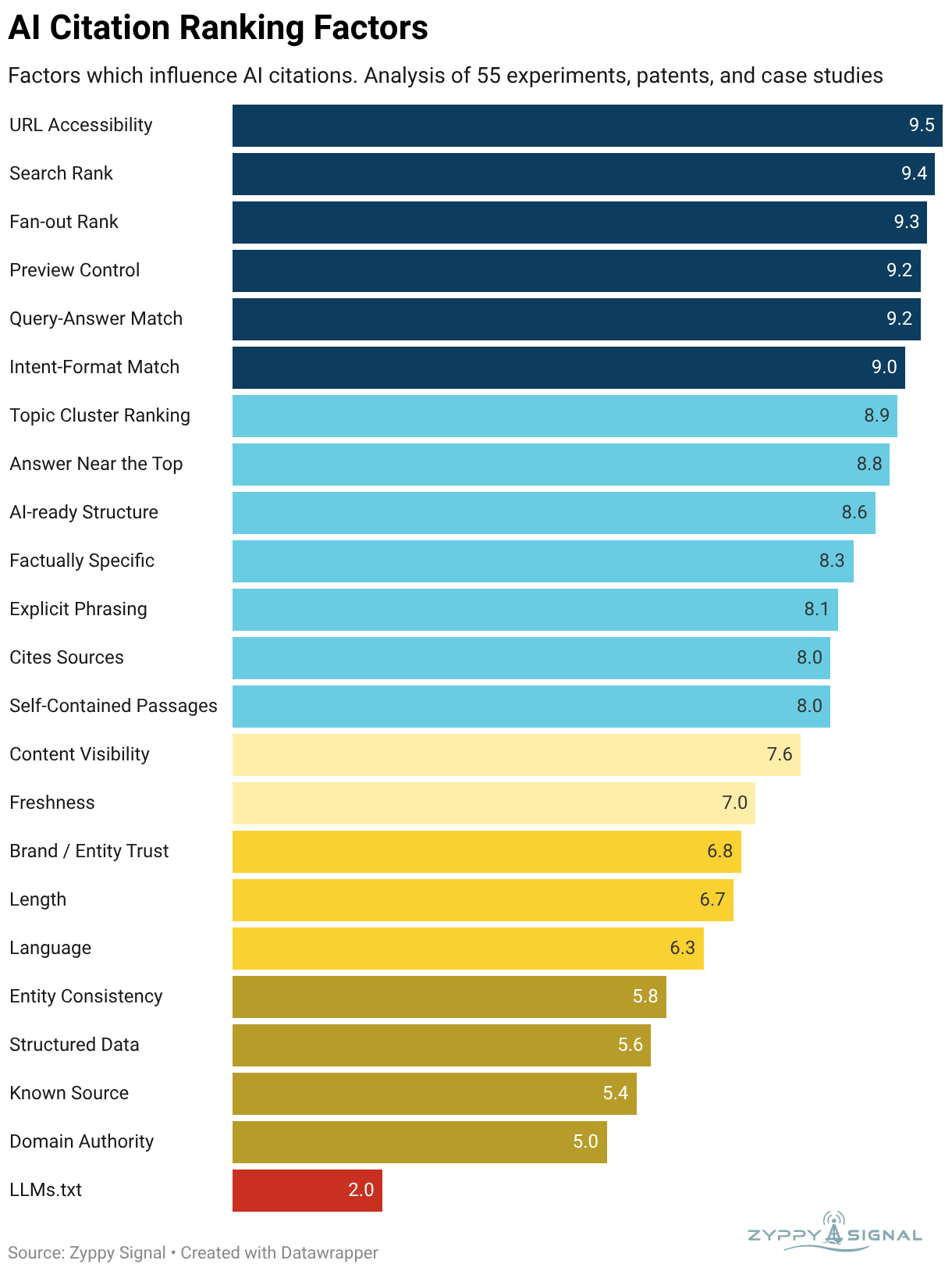
Source: Cyrus Shepard, AI Citation Ranking Factors, Zyppy Signal, May 2026. Scores measure correlation with AI citations across 55 experiments, patents and case studies, not confirmed ranking factors.
What 18,000 ChatGPT searches look like
We analyzed 17,962 web searches ChatGPT ran while answering prompts tracked in SupaIntent between August and November 2026.
| Pattern in ChatGPT's searches | Share of searches |
|---|---|
| Adds the current or last year ("2026") | 27.2% |
| Contains "best" | 17.6% |
| Contains "review" | 15.5% |
| Asks for "official" information | 12% |
| Uses site: to search one website | 9% |
| Mentions pricing or cost | 8% |
| Compares or asks for alternatives | 7.1% |
| Repeats the prompt word for word | 5.3% |
Three things stand out. ChatGPT's searches are short: 7.6 words on average, against 12.8 words in the prompts. It wants fresh lists, so it adds the year. And it checks facts at the source: one search in eight asks for official information, and one in eleven searches a single site such as hubspot.com or g2.com.
Perplexity behaves similarly but searches more: about 5 queries per answer, against a median of 1 to 2 for the ChatGPT answers where we captured searches.
How to see the searches ChatGPT runs
You can see the fan-out queries for any conversation in your browser:
- Ask your question in ChatGPT with web search on.
- Copy the conversation ID from the address bar: the part after
/c/. - Right-click the page, choose Inspect and open the Network tab.
- Paste the ID into the filter field and reload the page.
- Click the request for the conversation, open Response and search for
queries.
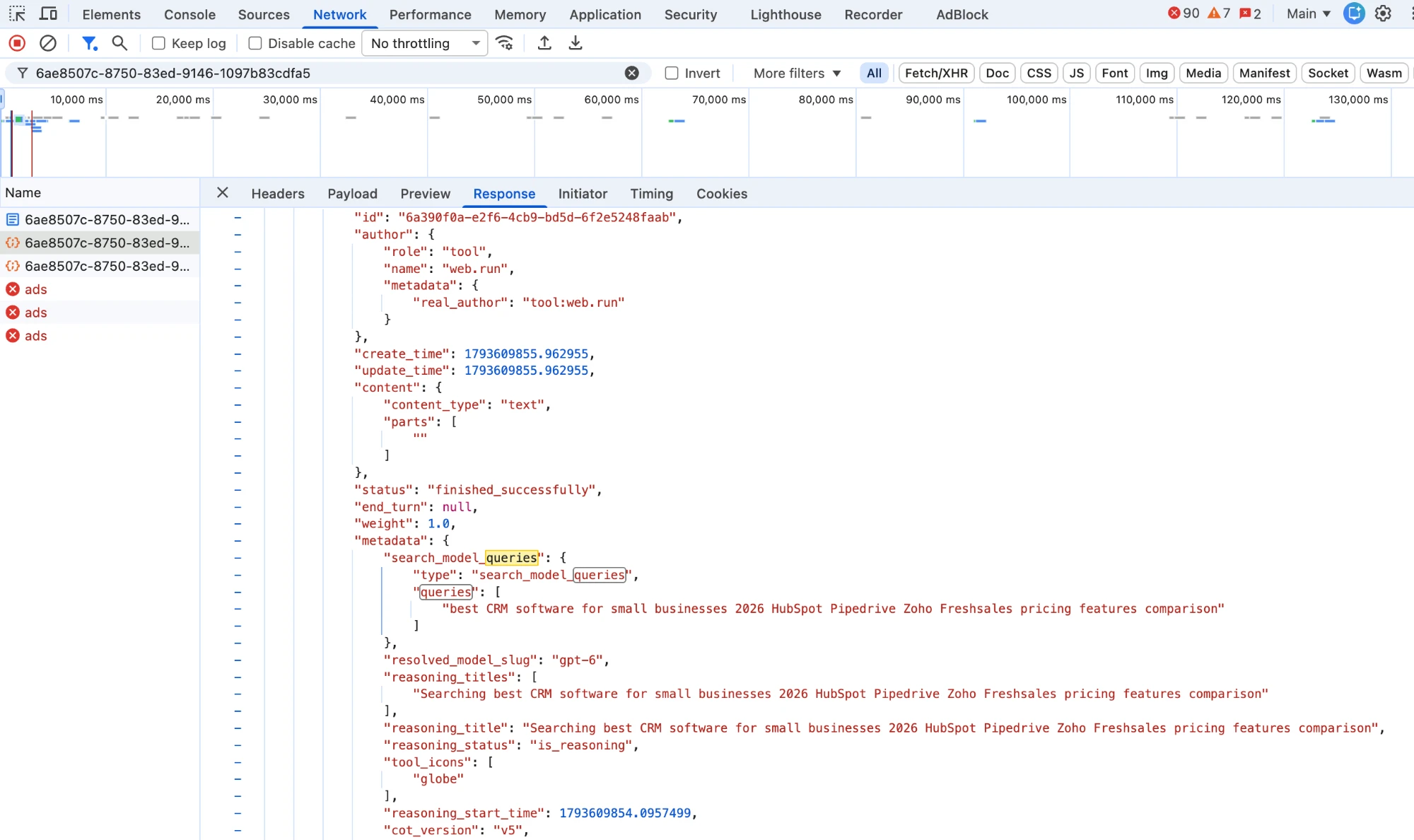
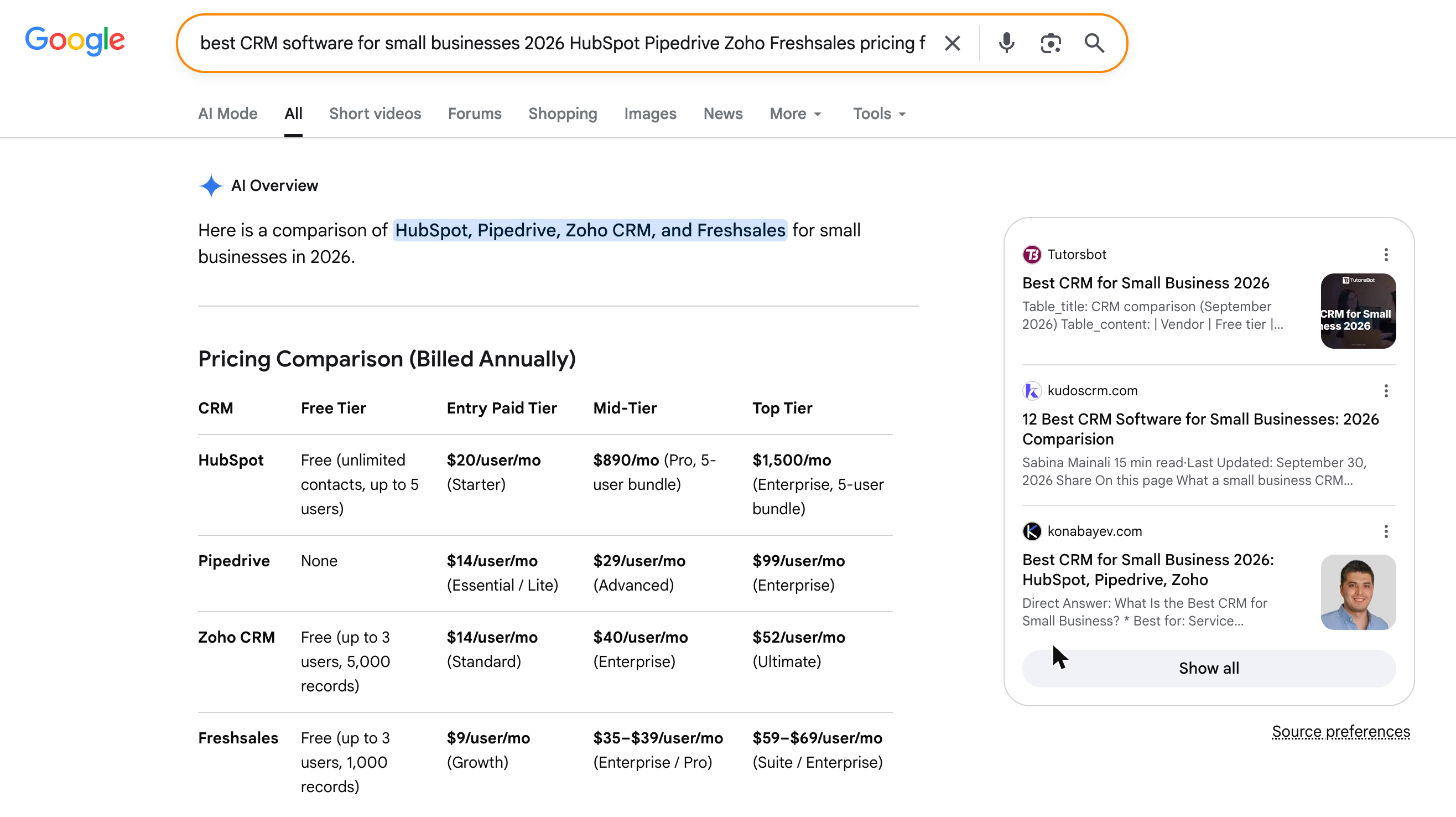
Here we asked "best CRM for small business". The search_model_queries field shows what ChatGPT really searched: "best CRM software for small businesses 2026 HubSpot Pipedrive Zoho Freshsales pricing features comparison". It added the year, five brand names and the words "pricing", "features" and "comparison".
Run that exact search in Google and you see the pool ChatGPT picks from: a 2026 pricing table for the same four CRMs and comparison articles updated in September 2026. Pages written for the short prompt "best CRM for small business" compete here only if they also cover pricing and features for these brands.
The list shows the exact searches ChatGPT sent. Write them down: these are the phrases your page needs to answer. Doing this by hand works for a few prompts. SupaIntent captures the searches for tracked prompts when ChatGPT exposes them, next to the answer and the pages ChatGPT cited.
What to do on your pages
1. Answer the fan-out queries, not only the prompt
Group the searches you collect by intent: best-of lists, pricing, reviews, comparisons, "official" facts. Make sure a page on your site answers each one directly. If ChatGPT searches site:yourbrand.com pricing, your pricing page must state prices clearly in text, not hide them behind a form or an image.
2. Put the main answer at the top
Models, like readers, want the point first. Start articles with a two or three sentence summary of the key conclusions, the way this article does. On product pages, put a short summary of what the product is, who it is for and what it costs right under the heading.
3. Link to authoritative sources
In an SEO experiment Sturm describes, built around a made-up word, pages that cited external sources ranked above pages that did not. Since ChatGPT picks from what search returns, the same logic carries over. Back claims with links to data, documentation and reputable publications.
4. Be present where ChatGPT checks
Review sites, Reddit and comparison articles show up in ChatGPT's searches and citations. See what sources ChatGPT cites for B2B software and Reddit and GEO, and use our free Top AI Citation Domains tool to see which sites are cited most right now.
What matters less than you think
- llms.txt. The lowest-scored factor in Shepard's analysis. It costs little to add, but it will not get you cited.
- Freshness for its own sake. Freshness scored 7.0, mid-table, below accessibility, relevance and structure. Changing the date on an old page does not help. ChatGPT adds the year to find current lists, so keep facts current, but a recent date without better content is not a ranking signal.
- Schema markup. Structured data scored 5.6, near the bottom, and the evidence is contested. Useful for search features, but it does not replace a page that answers the query.
Tools to track ChatGPT citations
Checking DevTools by hand works for one conversation. To know whether ChatGPT cites you across dozens of buyer prompts, every day, you need a tracking tool. Look for one that:
- Runs your own buyer prompts daily in ChatGPT, not only a modeled index.
- Stores the cited URLs for every answer, so you see which of your pages win and which competitor pages beat them.
- Shows the searches ChatGPT ran, so you know which phrases to optimize for.
- Covers Google AI Mode, Gemini and Perplexity too. They cite different sources, so a ChatGPT win does not carry over.
- Turns findings into tasks, not just charts.
SupaIntent does all five from $99 a month, with a 7-day free trial. For a side-by-side comparison of vendors and prices, read best AI visibility tools, or see the Profound, Otterly.AI and Peec AI alternatives.
Measure whether it works
Track the prompts your buyers ask and watch three things: whether ChatGPT cites your pages, which searches it ran, and whether your brand moves up in the answer. Our AI prompt tracking guide explains how to set this up, and how to improve brand visibility in ChatGPT covers the wider playbook.
Methodology
We analyzed 17,962 web search queries (13,770 unique) that ChatGPT ran while answering prompts tracked in SupaIntent between August 1 and November 1, 2026. Searches were captured for 17% of ChatGPT answers; the rest either did not search or did not expose their queries. Patterns were matched with keyword rules on lowercased query text. Factor scores come from Cyrus Shepard's AI Citation Ranking Factors analysis on Zyppy Signal, published May 2026. The CRM project is shown as a tracked example; no other customer is named.
See the searches behind your AI answers
Start a 7-day free trial of SupaIntent, add your buyer prompts and see which searches ChatGPT runs, which pages it cites and where your brand appears, in ChatGPT, Google AI Mode, Gemini and Perplexity.
FAQ
How do I get my website cited in ChatGPT?
Make sure your page matches the searches ChatGPT runs when it answers. Put the main answer at the top, keep facts such as pricing and features current, link to authoritative sources and make sure the page is accessible to crawlers and ranks in search for those queries.
How can I see what ChatGPT searches for?
Open the conversation in a browser, copy the ID after /c/ in the URL, open developer tools on the Network tab, filter by that ID and reload. Open the conversation request and search its response for "queries". A tracking tool such as SupaIntent captures these searches for tracked prompts when ChatGPT exposes them.
Does ChatGPT search the same words I type?
Rarely. In our data only 5.3% of ChatGPT's searches matched the user's prompt word for word. ChatGPT shortens the question, adds the current year in about a quarter of searches and adds brand names it already expects.
What is the best tool to track ChatGPT citations?
Pick a tool that runs your buyer prompts in ChatGPT daily, stores every cited URL and shows the searches ChatGPT ran. SupaIntent does this from $99/month across ChatGPT, Google AI Mode, Gemini and Perplexity, with a 7-day free trial.
Does llms.txt help get cited by ChatGPT?
Not much. In Cyrus Shepard's analysis of AI citation factors, llms.txt scored at the bottom of 23 factors. Accessibility, search rank and matching the fan-out queries matter far more.
Does schema markup help ChatGPT citations?
It is contested. Structured data scored 5.6 out of 10 in the Zyppy analysis, near the bottom. It does not hurt, but it will not make up for a page that does not answer the query ChatGPT searches for.




[ get started ]
Make AI Search your next revenue channel
Track and optimize visibility in ChatGPT, Gemini and other AI Search engines to drive traffic to your website that converts.