SupaIntent vs Peec AI: Features and Pricing
Investigate your category, read topic-level evidence, follow selected pages and review technical issues. SupaIntent connects that work through Action Plan and project chat.

Building product experiences that make AI visibility measurable and actionable.
The problem both tools solve
A visibility chart shows that a competitor is gaining ground. Your next question is more specific: which buyer needs explain the change, what does AI say about your brand and which pages support those answers?
 SupaIntent and
 Peec AI both help answer those questions. Brand monitoring, perception analysis and cited sources are shared parts of the investigation, described for Peec in SaaS Insight’s September review.
SupaIntent brings topic evidence, technical review and action priorities into one project. To choose between the platforms, compare the plan you need and the investigation your team wants to run: from a competitive question to the answer excerpt, cited source and next task.
Compare plans and research tools
Executive takeaway: compare the complete research workflow and its price. Both platforms offer monitoring, perception analysis, citations and MCP access. Peec has a lower monthly subscription price at the two prompt allowances below, as documented in Prefer’s September review.
| Buying criterion | SupaIntent | Peec AI |
|---|---|---|
| Monthly plan for 50 monitored prompts | $99/monthSupaIntent Growth. | $95/monthPeec Starter. |
| Monthly plan for 150 monitored prompts | $299/monthSupaIntent Pro, including MCP and Ads Radar. | $245/monthPeec Pro. |
| MCP access to project analytics | YesAvailable in Pro. | YesAvailable on self-service plans. |
| Brand and competitor monitoring | YesCompare visibility, positions and trends. | YesTracks visibility and competitive position. |
| Analysis of brand perception | YesTopic sentiment with supporting answer excerpts. | YesProvides perception analysis. |
| Analysis of cited sources | YesInspect cited pages and their related answers. | YesIncludes source and citation analysis. |
SupaIntent’s MCP tools retrieve metrics, compare periods, find records and open their details. Peec also provides agent access, as described in SaaS Insight’s account-based review. Agent connectivity is a shared capability in this comparison.
Compare the package you will use
Our Growth plan is $99/month for 50 prompts; Pro is $299 for 150 prompts and includes MCP and Ads Radar. Peec’s monthly Starter and Pro plans are $95 for 50 prompts and $245 for 150 prompts, as listed in Prefer’s September review.
Peec’s self-service plans let you select three engines; Gemini and Google AI Mode are among the choices. Our listed plans include those two Google engines. Choose the engine set that matches the buyer questions your team needs to investigate.
Compare the engines and modules your team will actually use. Equal prompt allowances do not make the entire packages identical. Prices here are monthly, excluding annual discounts, taxes and custom agreements.
From a competitive gap to a brief
SupaIntent gives your team several ways to investigate the same brand: buyer questions, category research, topic sentiment, source pages and technical checks. Use them together to build a brief with a specific problem and the evidence behind it.
See your questions alongside the category
Set up the project with your brand, website, research country and category. In Prompt Monitor, track your own questions in  ChatGPT,
  Google AI Mode and
  Gemini. Add prompts in bulk, organize them into thematic groups and expand your list with suggestions drawn from collected answers. Each question shows brand visibility, average position, trends, the leading brand and the main competitor. Open its full answer history with mentions and sources.
The project also provides 20 prepared category questions; choose which ones contribute to project statistics.
Category Visibility is a separate regular study of brands in the category, with mentions, visibility, positions, trends and sources. This gives your team another view of the market alongside its selected buyer questions. Competitor analytics automatically discovers brands and compares mentions, average positions and Share of Voice, with details by prompt and AI service. Exclude an irrelevant brand without losing its historical data.
Read the reasons behind brand perception
Consider an illustrative leadership meeting: your brand appears regularly, yet a competitor leads on questions about reliability. A single mention count cannot tell your team which claim to investigate first.
In SupaIntent, start with Content Gaps to identify the questions where that competitor is more visible. Open the answers and inspect the topic sentiment matrix. Positive, negative and neutral observations show how each brand is described, with excerpts that support the assessment.
Follow the history of a theme and inspect the negative topics that need attention. Content Gaps also identifies themes where your brand leads, so the brief can preserve a strength as well as address a competitive weakness.
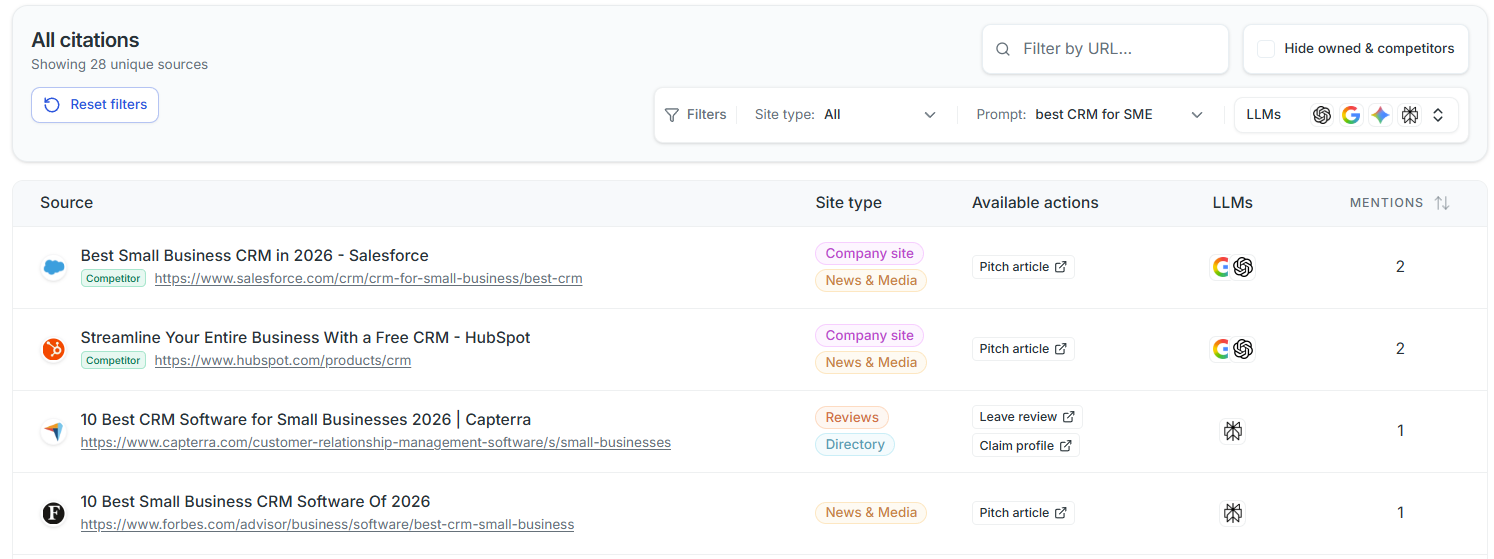
Then inspect the sources. A recurring statement might come from an outdated review, a comparison page or your own documentation. Compare citation frequency, answer coverage and source types across your own and competing sites. Filter citations by period, provider, prompt group, individual prompt or source and open the related responses. Export the records in CSV or Excel when your team needs an evidence file.
Check the site and assign the next task
Tech Review checks robot access, robots.txt, sitemaps, llms.txt, content in HTML, structure, semantics, metadata and company information. It provides scores by area, an overall score, identified problems, recommendations and a history of changes. Action Plan brings those problems, source opportunities, content gaps and negative themes into practical priorities.
Brand Pages shows which pages of your own site are cited, how often, by which AI services and for which prompts. Open related answers for your selected period. Add an important URL to Content Monitor to follow whether that page appears in later collected answers. Content Monitor accepts links to your own or external publications. Your brief can now identify the question, the answer excerpt, the source and the proposed change.
Continue the investigation in your project
Ask the built-in project chat what changed between periods or which records support a conclusion. Save, continue and archive conversations as the review develops. On Pro, connect an external agent through MCP to read your project’s metrics and retrieve supporting records.
For a product or location question, search, filter and sort the Products & Places gallery of cards from project and category answers, with images, links and available attributes. Pro’s Ads Radar shows advertisers, ad content and links, with filters by service and prompt, placement trends and leading advertisers’ share of observed ads.
Investigate Reddit, YouTube and review sources
SupaIntent gives you dedicated views of the communities, videos and review pages cited in AI answers. Use them to identify the discussions and publishers your team should read before choosing where to contribute, update information or explain your product.
Reddit Radar: find the conversations AI draws on
See the most-cited communities and discussions, how often they appear, which AI services cite them and which brands appear in the associated answers. Reddit Radar also separates external sources that explicitly mention Reddit. Your team can follow a recurring concern to a specific discussion and decide whether it deserves attention.
YouTube Radar: identify the videos behind recommendations
Find leading cited channels and videos, with citation frequency and the share of collected answers that cite YouTube. Inspect available publication dates, duration, views, likes, comments and channel subscriber counts. These details help your team assess the cited material and choose which product explanation or demonstration to investigate.
Review Radar: inspect the pages shaping the shortlist
Explore cited sources from platforms such as G2, Trustpilot, Capterra, Clutch, Gartner Peer Insights and Tripadvisor. Review Radar ranks platforms by citation frequency and brands by their presence in answers containing review-platform links. Inspect specific pages, separated into profiles, categories, comparisons, reviews and complaints, then open the supporting AI answers. This gives your team a concrete source to assess when reviewing its positioning or reputation.
Choose SupaIntent
Choose SupaIntent for a workflow that connects competitive gaps, topic sentiment, cited sources, Tech Review and Action Plan. Read the supporting answers, identify a technical or content task and give your team a brief grounded in project evidence.
Sources and scope
Checked in September 2026. SaaS Insight provides an account-based review of reporting and MCP. Prefer supplies the monthly pricing and selectable-engine description.
This comparison is authored by SupaIntent and uses specific feature descriptions rather than review ratings. SupaIntent claims cover customer capabilities, excluding Beta and internal tools, with module access dependent on subscription. The example is illustrative. The table compares pricing and available capabilities; it does not rank implementation depth, security, answer accuracy or business outcomes.

[ get started ]
Make AI Search your next revenue channel
Track and optimize visibility in ChatGPT, Gemini and other AI Search engines to drive traffic to your website that converts.